Panel
Panel
4-side Ultra Thin, In-Plane Switching
Max View Area
- Active Area: 929.3 x 392 mm
- Screen Dimension: 942.6 x 414.5 mm
Pixel Pitch
0.1815 x 0.1815 mm
Dot / Pixel Per Inch
140 dpi
Contrast Ratio
- Contrast Ratio (Typical): 2000:1
- Dynamic Contrast Ratio (Typical): 3000000:1
View Angle (H / V)
Horizontal: 178°, Vertical: 178°
Response Time
- Extreme Mode: 4ms GtG
- Normal Mode: 6ms GtG
Color Gamut
- Coverage Ratio: 99% sRGB (CIE 1931)
- Coverage Ratio: 98% DCI-P3 (CIE 1976)
- Coverage Ratio: 99% BT.709 (CIE 1931)
Color Support
1.07 Billion
Color Depth
10-bit (8-bit+FRC)
Screen Surface Treatment
Anti-glare
Operating System
Operating System
- Windows® 11 Support
- Windows® 10 Support
Multi-Media
Camera
- ThinkVision® VoIP Stack MC60 monitor webcam (For models 64B4ZAT1 and 64B4ZAR1)
- No bundled webcam (Support ThinkVision® VoIP Stack MC60 Monitor Webcam, sold separately)
Speakers
- Integrated Speakers, 5W x2
- Support MS30 Monitor Soundbar, sold separately
Power Supply
Power Consumption
- Typical / Max: 41W / 300W
- Sleep / Off mode: <0.5W
- Switch-off Mode: <0.3W
- Energy Star Power On: 38.1W
- Energy Star TEC: 127kWh
- Internal Power Supply
Voltage Required
AC 100 to 240 V (50-60Hz)
Special Features
Special Features
- HDR10 Compliance
- Factory Calibration: Avg. Delta E<2 at sRGB and DCI-P3
- Picture In Picture (PIP) / Picture By Picture (PBP) Support
- Lenovo® ThinkColour (Lenovo® Accessories and Display Manager) Support
Lenovo® ThinkColour supports Windows® 10 & 11, Mac OS (functions vary across systems).
Lenovo® Accessories and Display Manager is formerly Lenovo® Display Control Center.
- AI Power Saving Mode
- KVM Switch (with eKVM)
- LDFM (Lenovo® Display Fleet Manager)
- Mirrored Power Button
- Multi-sync
- Natural Low Blue Light
- Smart Power
- True Split
- Smart Sensor (Ambient Light Sensor)
- DP Power Saving (Panel Replay)
Mechanical
ThinkCentre® M Series Support
To support Tiny devices, an additional ThinkCentre® Tiny Mounting Kit (PN:4XF1R07369) is required (sold separately).
Bezel Width
- Side: 2.0mm
- Top: 2.0mm
- Bottom: 14.1mm
Dimensions (WxDxH)[1]
| Head Only | 947.6 x 105.3 x 419.5 mm (37.31 x 4.15 x 16.52 inches) |
| Lowest Position | 947.6 x 227.1 x 453.5 mm (37.31 x 8.94 x 17.85 inches) |
| Highest Position | 947.6 x 227.1 x 608.5 mm (37.31 x 8.94 x 23.96 inches) |
Packaging Dimensions (WxDxH)
1071.0 x 227.0 x 525.0 mm (42.17 x 8.94 x 20.67 inches)
Weight[2]
| Monitor With Stand | 13.5 kg (29.8 lbs) |
| Monitor Head Only | 9.7 kg (21.4 lbs) |
Packaging Weight
20.5 kg (45.1 lbs)
Mounting
Supports VESA mount 100 x 100 mm
Stand
Supports -5° to +23.5° tilt, left & right 45° swivel, up to 155mm lift
In the Box
- Monitor with stand
- 1x DP 1.4 cable (1.8m)
- 1x Power cable (1.8m)
- ThinkVision® VoIP Stack MC60 monitor webcam (For models 64B4ZAT1 and 64B4ZAR1)
- 1x Thunderbolt™ cable (1.5m, 40Gbps)
- Factory calibration report
- Quick setup guide
Notes:
| [1] The system dimensions may vary depending on configurations.Feature Default |
| [2] The system weight is approximate and based on results in Lenovo® lab, which varies depending on the source of component, variance of the distribution of each component, and manufacturing process. It may not be the exact weight for each specific model.Feature Default |
Network
Ethernet
Support 2.5Gb / 1000M / 100M / 10M, 1x RJ45
Ports[1]
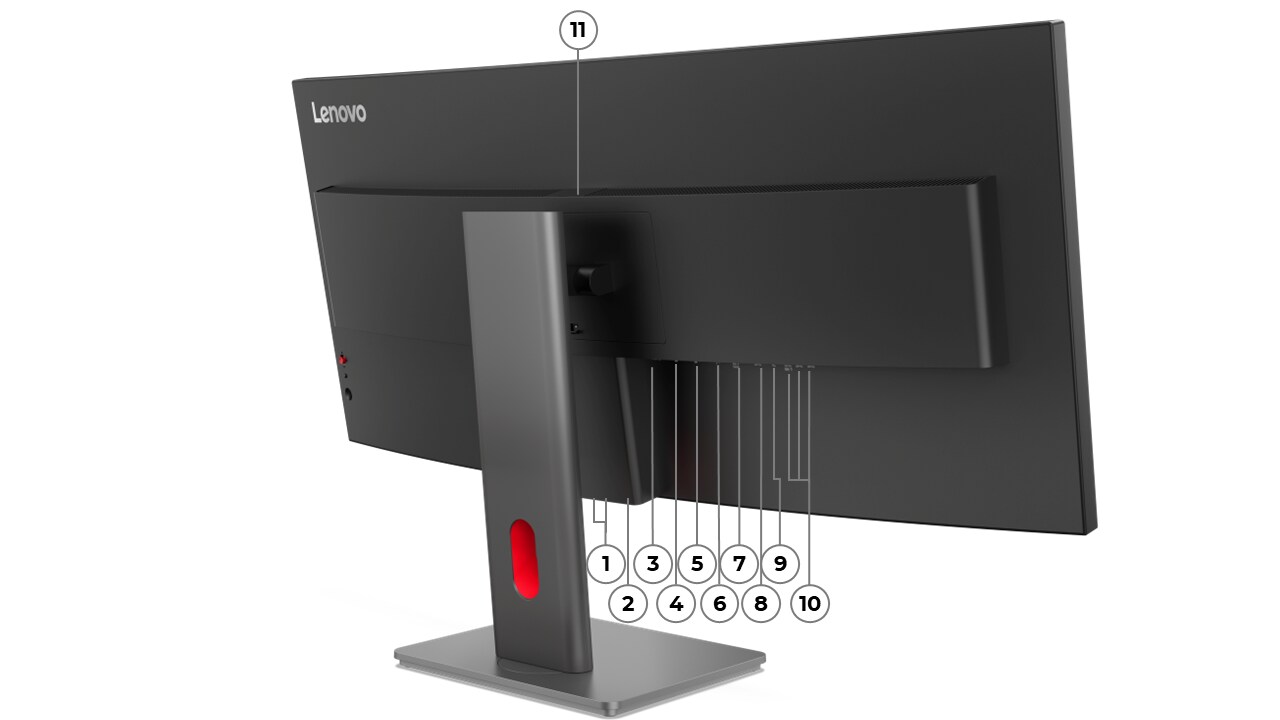
Rear Ports
- 1x Thunderbolt™ 4 (40Gbps) with PD 3.1 up to 140W and DisplayPort™ 1.4 Alt Mode HBR3, USB upstream
- 1x Thunderbolt™ 4 Out
- 2x USB-C® (USB 5Gbps / USB 3.2 Gen 1) with up to 15W PD, data transfer only, USB downstream
- 5x USB-A (USB 5Gbps / USB 3.2 Gen 1), 1x BC1.2, USB downstream
- 1x USB-B (USB 5Gbps / USB 3.2 Gen 1), USB upstream
- 1x HDMI® 2.1 TMDS, supports 5120x2160@120Hz
- 1x DisplayPort™ 1.4 (HBR3), supports max.bandwidth 32.4Gbps
- 1x DisplayPort™ 1.4 (Out)
- 1x Ethernet (2.5GbE RJ-45)
Notes:
| [1] The transfer speed of following ports will vary and, depending on many factors, such as the processing speed of the host device, file attributes and other factors related to system configuration and your operating environment, will be slower than theoretical speed.
USB 2.0: 480 Mbit/s;
USB 3.2 Gen 1 (SuperSpeed USB 5Gbps, formerly USB 3.0 / USB 3.1 Gen 1): 5 Gbit/s;
USB 3.2 Gen 2 (SuperSpeed USB 10Gbps, formerly USB 3.1 Gen 2): 10 Gbit/s;
USB4® 20Gbps / USB 3.2 Gen 2x2 (SuperSpeed USB 20Gbps): 20 Gbit/s;
USB4® 40Gbps (USB 40Gbps): 40 Gbit/s;
Thunderbolt™ 3/4: 40 Gbit/s.StructureLevel2 |
Security
Physical Locks
Kensington® Nano Security Slot™ (2.5 mm x 6 mm)